

Kimi Code CLI Configuration Guide
¶ 1. Obtain an API Key
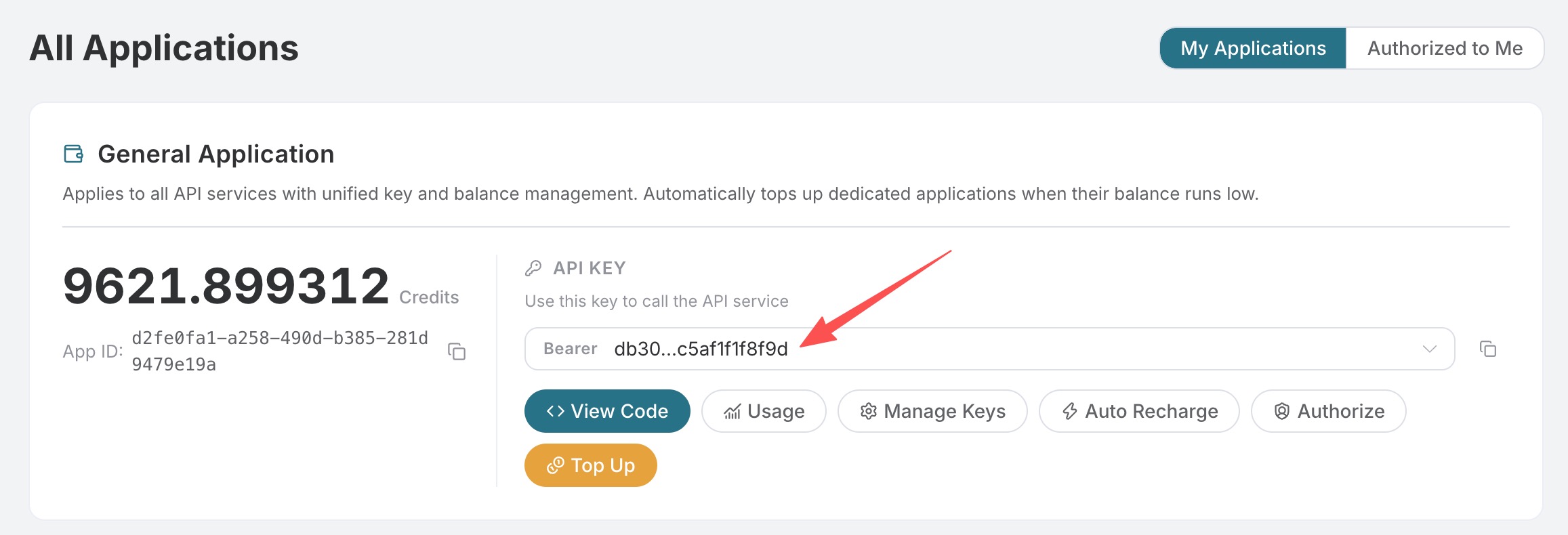
Open the AI 聚合|元宪智能 application list, enter an available application, and copy the API Key.
¶ 2. Install Kimi Code
macOS / Linux:
curl -fsSL https://code.kimi.com/kimi-code/install.sh | bash
Windows PowerShell:
irm https://code.kimi.com/kimi-code/install.ps1 | iex
Users who already have Node.js 22.19.0 or later installed can also install it via npm:
npm install -g @moonshot-ai/kimi-code
kimi --version
The following configuration has been verified with Kimi Code CLI 2.7.3.
¶ 3. Configure AI 聚合|元宪智能
Edit ~/.kimi-code/config.toml in the user home directory ($HOME\.kimi-code\config.toml on Windows), and add the following configuration. If KIMI_CODE_HOME is set, edit config.toml in that directory. Place the configuration file outside the project directory to prevent the Agent from reading the Key into the context when reading the project.
default_model = "acedatacloud/MODEL_ID"

[providers.acedatacloud]
type = "openai"
base_url = "https://api.yxai-tech.top/v1"
api_key = "your API Key"

[models."acedatacloud/MODEL_ID"]
provider = "acedatacloud"
model = "MODEL_ID"
max_context_size = 32768
Go to the model catalog to view model names (for example, claude-opus-5, gpt-6-sol), and replace all MODEL_ID values with the same name; for precise verification, use the id value in the /v1/models response. This value is the model name used by the API model parameter, not the UUID of the service or API. type = "openai" uses the OpenAI Chat Completions protocol.
Explicitly configure a positive integer max_context_size to control the context budget. The example first uses 32768 tokens; when a larger context is needed, adjust it according to the actual limit of the selected model. Only Chat Completions is configured here; do not switch Kimi models to the Claude Messages /v1/messages.
The configuration file contains the Key. On macOS / Linux, it is recommended to restrict permissions:
chmod 600 ~/.kimi-code/config.toml
If KIMI_CODE_HOME is used, set permissions for the configuration file in that directory. Do not commit Keys, configurations containing Keys, or session export files to Git or share them directly.
¶ Optional: Read the Key from an Environment Variable
If you manage the Key through an environment variable, delete the api_key line in [providers.acedatacloud] and replace it with:
api_key_env = "ACEDATACLOUD_API_KEY"
Securely set ACEDATACLOUD_API_KEY in the same terminal or process environment that starts kimi, with the value set to your Ace Key. Only one of api_key and api_key_env can be retained; if the variable is unset or empty, actual requests will return an error. Setting only OPENAI_API_KEY or ACEDATACLOUD_API_KEY without configuring api_key_env will not automatically provide credentials to this provider. Do not include environment variable values when sharing the configuration.
¶ 4. Check the Configuration for Free
The following commands check the local configuration and Provider, do not send model generation requests, and cannot replace validation through actual calls:
kimi doctor config
kimi provider list
Confirm that configuration validation passes and that acedatacloud and openai are visible in the Provider list.
¶ 5. Make the First Call and Start
After confirming the API Key, model access permissions, and available quota, you can execute a short request. This command will incur model invocation charges:
kimi -p "Reply only OK"
After entering the project, run kimi to start using it. If a 401 is returned, check the API Key; if it indicates model not found, confirm that default_model, the model catalog name, and the model field use the same ID.
¶ 6. Install Optional Media Plugins
Open the plugin catalog maintained by AI 聚合|元宪智能 in the Kimi interactive interface:
/plugins marketplace https://raw.githubusercontent.com/AceDataCloud/Skills/main/platforms/kimi-code/marketplace.json
Select the plugin to install, press Enter, verify the source, and confirm the installation. You can view installed plugins through /plugins list.